Inbox Placement Tests: Do Cold Emails Hit Inbox?
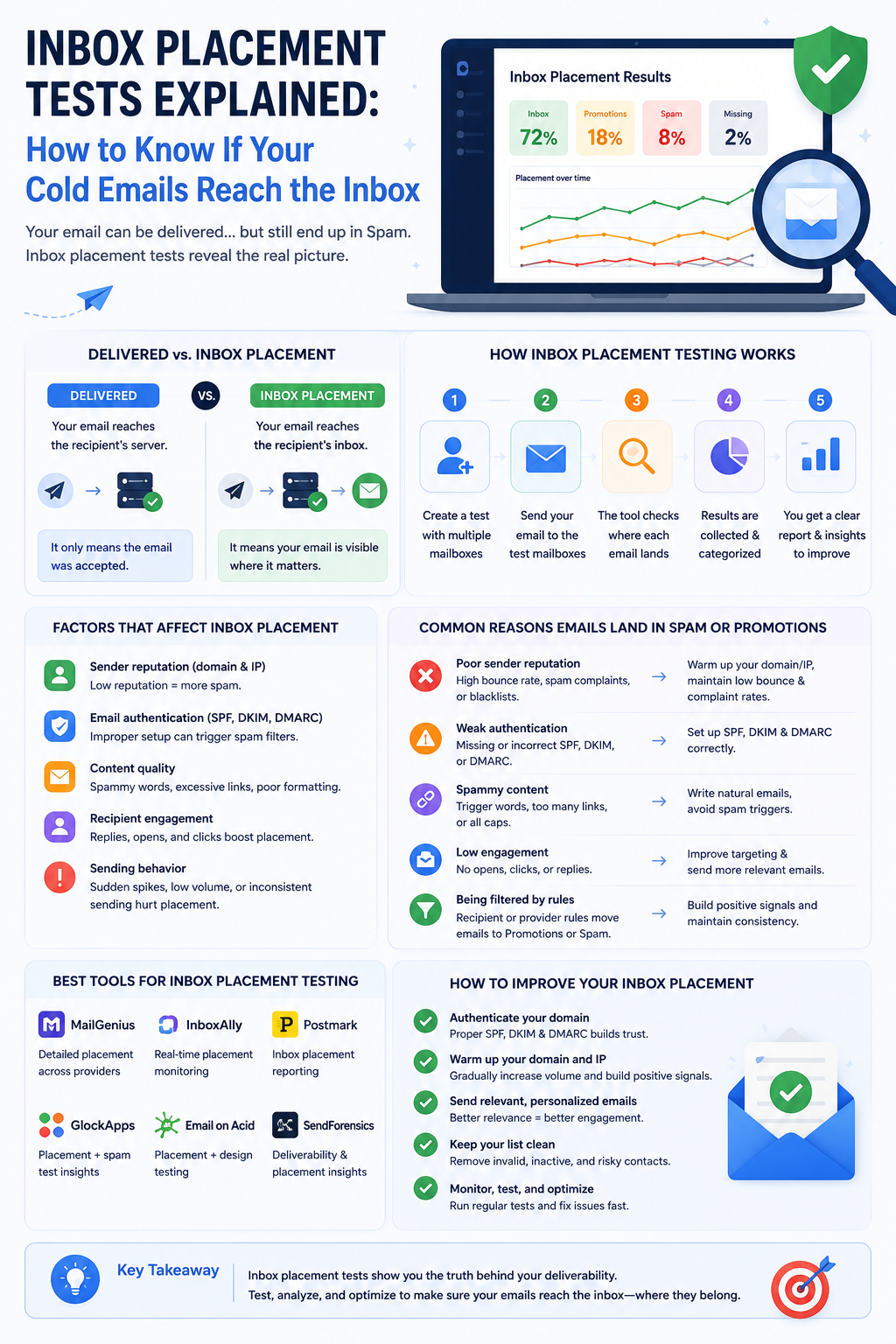
Inbox Placement Tests: Know If Cold Emails Hit the Inbox
Your delivery rate says 99%. Your reply rate says something is very wrong. Inbox placement tests tell you what's actually happening between those two numbers — and fixing it is usually the difference between a campaign that books meetings and one that silently dies in spam.
Delivery Rate Doesn't Tell You the Full Story
Most SDRs track delivery rate and assume it means their emails are getting through. It doesn't. Delivery just means the receiving mail server accepted the message — it says nothing about where that message ended up.
A 99% delivery rate and 60% spam placement can coexist without contradiction. Your emails arrived at the server. They just never reached the inbox. Recipients never saw them, never opened them, never had a chance to reply.
Inbox placement is the metric that fills this gap. It measures where an email actually appears: the primary inbox, the spam folder, a promotions tab, or nowhere at all. SDRs who only watch delivery rate are optimizing the wrong number.
What an Inbox Placement Test Actually Measures
An inbox placement test evaluates four things, and each one tells you something different.
- Inbox rate — the percentage of test emails that land in the primary inbox. This is the headline number. Higher is better.
- Spam placement — how often your emails are filtered before recipients ever see them. Even occasional spam placement at scale destroys reply rates.
- Missing messages — emails that appear in neither the inbox nor the spam folder. These point to outright blocks or delivery failures worth investigating immediately.
- Folder classification by provider — placement broken down across Gmail, Outlook, Yahoo, and others. Placement varies significantly between providers, and a blended average masks the differences.
The goal isn't just to confirm emails are landing somewhere. It's to know exactly where, with enough granularity to act on the result.
How Seed List Testing Works in Practice
The mechanism behind most inbox placement tests is a seed list — a collection of real test addresses hosted across major mailbox providers, monitored specifically to track where incoming messages land.
You send your campaign (or a test version of it) to the seed list before or alongside your real audience. The platform checks each seed address and reports back: inbox, spam, promotions, or missing. The result is a provider-by-provider breakdown of where your emails are actually going.
This is where the value becomes concrete. You might find you're hitting the inbox for Gmail recipients but landing in junk for Outlook. Without provider-level detail, you'd see acceptable aggregate numbers while Outlook contacts never hear from you.
One important caveat: seed list results are indicators, not guarantees. Real recipients have engagement histories, contact lists, and individual filtering preferences that seed addresses don't replicate. A clean seed list result improves confidence — it doesn't certify inbox placement for every real recipient. Treat it as a strong signal, not an absolute truth.
Gmail and Microsoft Each Filter Differently — Test Both
Gmail and Microsoft run different filtering systems, weigh different signals, and arrive at different conclusions about the same email. Strong performance in one ecosystem tells you almost nothing about the other.
Gmail places significant weight on domain reputation, recipient engagement signals, and authentication. A drop in any of these tends to show up as spam placement relatively quickly. Gmail's filtering is sensitive to behavioral patterns — if engagement falls, inbox placement often follows.
Microsoft evaluates sender reputation, complaint rates, and its own junk filtering logic through separate infrastructure. An email that sails through Gmail's filters can hit Outlook's junk folder for entirely different reasons — a reputation issue that only affects Microsoft's assessment, or a content signal that triggers Microsoft's filters but not Gmail's.
Testing both providers separately is the fastest way to isolate whether a problem is infrastructure-wide or isolated to one ecosystem. If you're only hitting spam in Outlook, the fix is different than if you're hitting spam everywhere. Provider-specific placement analysis gives you the right diagnosis before you start changing things.
What Spam Folder Diagnostics Reveal Beyond Placement
Spam placement is a symptom. The diagnostic work is figuring out the cause — and there are several distinct causes that each require a different fix.
Start with authentication. SPF, DKIM, and DMARC failures are the most fixable root cause and the first thing to rule out. If any of these are failing, mailbox providers have concrete technical reasons to distrust your email. Fix authentication before investigating anything else — there's no point tuning your content if your DKIM is broken.
After authentication, look at bounce rates and spam complaint rates. High bounce rates signal list quality problems, and high complaint rates signal targeting or relevance problems. Both damage sender reputation over time, and both tend to precede a spam folder spike rather than follow it. If these numbers are trending up, spam placement is usually close behind.
Content issues are a third layer. Broken links, mismatched tracking domains, excessive promotional language, or suspicious redirects can all trigger filters independently of your reputation and authentication. If authentication is clean and reputation is healthy but spam placement persists, content is the next place to look.
When to Run an Inbox Placement Test
The most important time to run an inbox placement test is before a campaign touches your real prospect list. Catching a spam placement problem during a pre-launch test costs you nothing. Catching it after you've burned through 2,000 prospects costs you those contacts and the reputation damage that came with it.
Beyond pre-launch, run a test after any infrastructure change. New sending domain, updated DNS records, new mailboxes, switched providers — any of these can shift your placement in ways that aren't visible in delivery reports. Infrastructure changes that look fine technically can still move you from inbox to spam.
When reply rates drop unexpectedly, inbox placement testing should be the first diagnostic step, not the last. The instinct is to blame the copy. More often, placement has shifted and fewer prospects are seeing the email at all. [unverified] Industry experience suggests spam placement is the cause of unexplained reply rate drops more often than weak copy.
Finally, inbox placement testing works best as an ongoing monitoring cadence rather than a one-time pre-launch ritual. Running tests regularly gives you a baseline. Deviations from that baseline are early warnings — caught before they compound into full reputation damage.
Next Steps
Use this checklist before your next campaign launch and whenever something looks off:
- Run a seed list test before sending to your real prospect list
- Check placement results broken down by provider — Gmail and Outlook separately
- Verify SPF, DKIM, and DMARC are all passing before diagnosing anything else
- Review bounce rate and spam complaint rate trends from recent campaigns
- If reply rates have dropped, run a placement test before rewriting your copy
- Set a recurring testing cadence — not just pre-launch, but ongoing
- Investigate any missing messages immediately; these indicate blocks, not just filtering
- After any infrastructure change, retest before scaling volume back up
XemailCampaign's built-in deliverability monitoring runs alongside your campaigns so you're not waiting until reply rates tank to find out something went wrong. [unverified: specific inbox placement testing feature details — confirm with product team before publishing]