Cold Email Mastery: The Framework That Actually Gets Replies
Real talk: You've sent 500 cold emails this month. Got 8 replies. Three were unsubscribes. Two were "not interested." And the rest? Radio silence.
So now you're wondering if cold email is dead, or if you just suck at it.
Here's the uncomfortable truth: Cold email isn't dead. Your approach is.
Most cold emails fail not because of bad timing or poor deliverability (though those don't help). They fail because they read like spam, sound like everyone else, and give the recipient zero reason to care.
Let me show you the framework that separates 40% reply rates from 2% disappointment. Spoiler: it's not about fancy tricks or growth hacks. It's about actually understanding what makes humans respond.
What Cold Email Actually Is (And Isn't)
Cold email is not about. mass blasting your entire prospect list with"Quick question about your outbound" subject line or a pitch disguised as a question. It is more of an invitation to a conversation by proving you understand their problem better than they do.
Think of it this way: You wouldn't walk up to a stranger at a bar and immediately pitch your product. (If you would, please stop.) You'd find common ground, ask questions, build rapport. Same logic applies to cold email.
Quick gut check: Does your current cold email template work if you read it out loud to a friend? Would you be embarrassed? If yes, your recipient definitely is.
The 4-Part Framework (That Actually Works)
Here's the structure that consistently gets replies. Not sometimes. Not "when the stars align." Consistently.
Part 1: Make an Observation (Lead With Research)
Your recipient gets dozens of sales emails daily. Most get ignored because they're generic garbage. Your job? Prove in the first sentence that this email is specifically for them.
What to reference:
Recent LinkedIn post or company announcement
Hiring activity (new roles, team expansion)
Product launch or funding round
Tech stack changes or tool adoption
Industry event they spoke at or attended
The test: Could this opening line apply to 100 other people? If yes, start over.
Before you hit send, run your emails through XemailAudit. The AI writing assistant catches generic openers, spam triggers, and relevance issues that tank your deliverability. Because even perfect research means nothing if your email lands in spam.
Part 2: Make a Connection (Turn Research Into Insight)
Anyone can list facts. Top performers turn facts into hypotheses about the recipient's problems.
This is where most people fail. They mention the LinkedIn post or hiring announcement, then immediately pivot to pitching their product. That's not a connection, that's a bait-and-switch.
The formula: Observation → Implication → Problem you solve
Example:
Observation: "Saw you're hiring 3 new SDRs in Austin"
Bad connection: "We help companies scale their sales teams!"
(Generic. Could apply to anyone hiring.)
Good connection: "With leadership focused in NYC, I'm guessing you're thinking about how to ramp those remote reps without flying out every week."
(Specific. Shows you understand the implication of their situation.)
Here's why this works: You're not just proving you Googled them. You're proving you understand their business well enough to anticipate problems they haven't even articulated yet.
Part 3: Build Credibility (Prove You Can Actually Help)
Now they know you've done your homework and understand their situation. Next question in their head: "Can this person actually help, or are they just good at research?"
Ways to build credibility:
Option A: Social Proof
"We helped [similar company] solve this exact problem and cut onboarding time by 40%."
The key: "Similar company" must actually be similar. If you're emailing a 20-person startup, citing Salesforce as a customer means nothing. Find a relevant comp.
Option B: Simple Value Prop
"Our platform automates email coaching so your managers can focus on deals, not proofreading."
The key: One sentence. No jargon. Your grandma should understand it.
What NOT to do:
"We're a cutting-edge, AI-powered, next-generation platform that leverages synergistic solutions..."
Buzzword bingo makes you sound like every other vendor
Clear beats clever every single time
Part 4: Ask a Question (Call to Conversation, Not Action)
Here's where 90% of cold emails die a tragic death.
The graveyard of bad CTAs:
"Do you have 15 minutes this week?"
"When can we schedule a call?"
"Let me know a good time to chat!"
Why these fail: You're asking for a high-commitment action from someone who doesn't know you, doesn't trust you, and is already drowning in meetings.
What works instead: The Call to Conversation (CTC)
Make it stupidly easy to respond with a yes/no or short answer.
Something like this:
"Worth exploring, or are you handling this internally?"
"Does this resonate, or am I off base?"
"Is this even on your radar right now?"
The psychology: These questions are low commitment, Ego stroking and conversation starters.
Once you get that first reply and build rapport, then you can suggest a meeting. By that point it feels natural, not pushy.
Putting It All Together: The Framework in Action
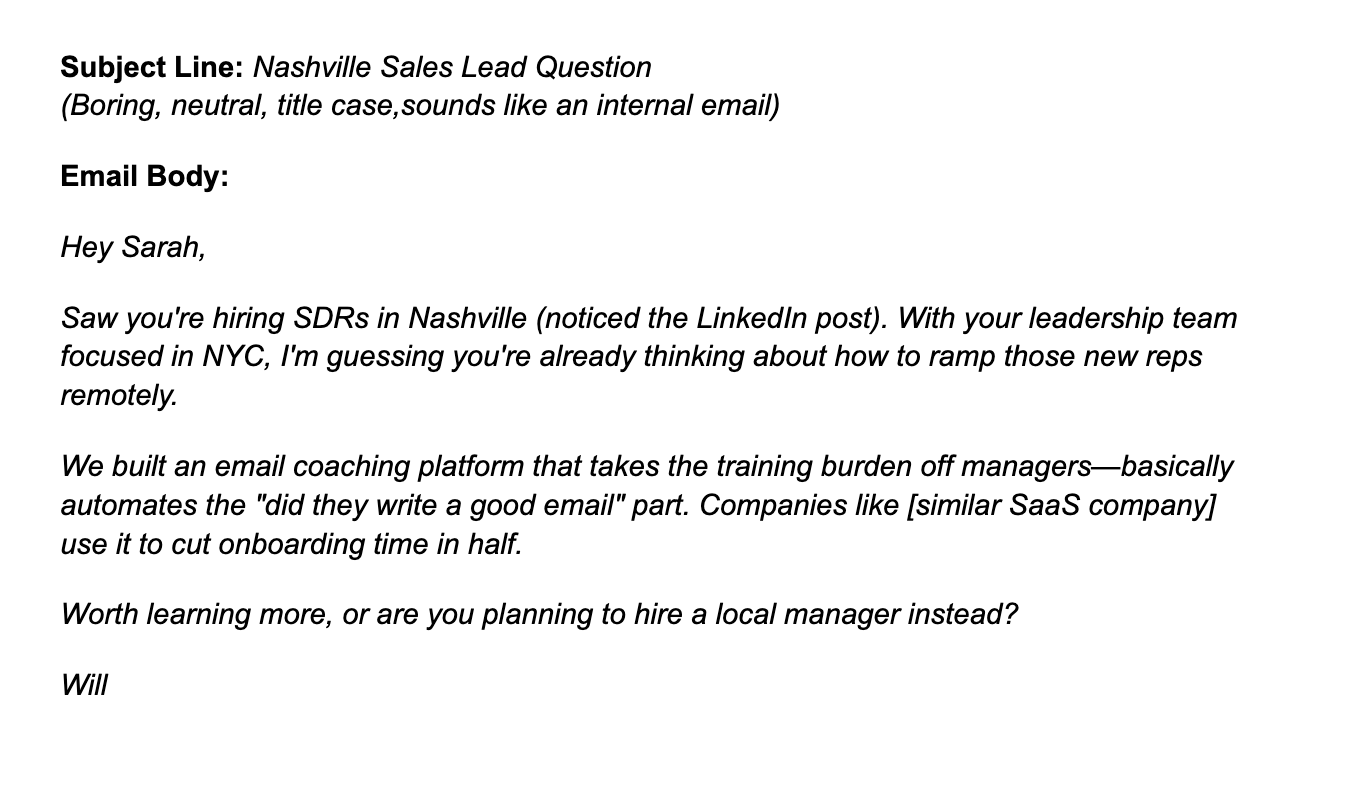
Why this works:
Observation: Hiring in Nashville (specific, timely)
Connection: Remote ramp challenge (insight from research)
Credibility: Email coaching platform + social proof
CTC: Easy yes/no question
Total word count: 68 words
Reading level: 5th grade
Time to scan: 11 seconds
Perfect.
The Subject Line (Don't Overthink It)
Your subject line can hurt you more than help you. Here's why: recipients categorize your email before opening it. If they think "sales pitch," you're fighting uphill.
The golden rule: Boring is best
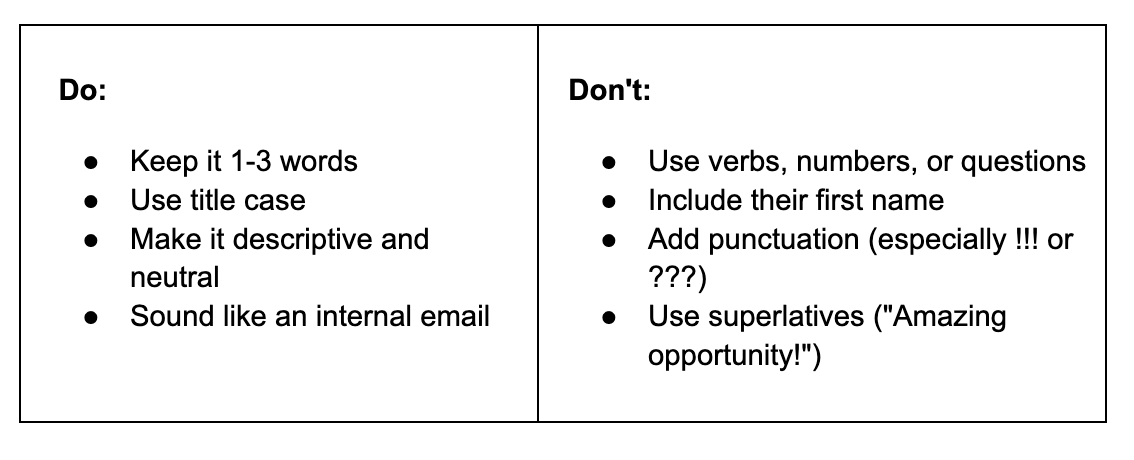
Why this works: Your goal isn't to trick them into opening. It's to not give them a reason to delete.
The secret weapon: Preview text
Preview text is what appears next to your subject line in their inbox. It's actually more important than the subject because it's the real decision-maker.
Make it count. Your first sentence should immediately show personalization.
Bad preview: "I hope this email finds you well..."
Good preview: "Saw you're hiring SDRs in Nashville..."
Body Copy Rules That Get Replies
Rule 1: Short = More Replies
Emails under 75 words see 83% more replies. Aim for 25-50 words if possible.
Why? Your recipient scans your email for 11 seconds. That's it. Make every word count.
Pro tip: Most cold emails are written on desktop but opened on mobile. That single-line paragraph on your screen? It's 3-4 lines on their phone. Break. It. Up.
Rule 2: Embrace White Space
One-line sentences.
Like this.
Make your email easy to scan. Blocks of text get skipped.
Rule 3: Write at a 3rd-5th Grade Level
Before you protest, this doesn't mean dumbing it down. It means being clear.
70% of cold emails are written at 10th-grade level or higher. Data shows 3rd-5th grade reading level gets 67% more replies.
Why? Your reader is busy and skimming. Big words, jargon, and complex sentences slow them down. They bail.
Run your email through XemailAudit's AI writing assistant. It flags complex language, buzzwords, and readability issues automatically.
Rule 4: Watch Your Tone
Too formal = robotic. Too casual = unprofessional.
The sweet spot: Friendly, confident, and conversational.
Test: Read your email out loud. Would you say this to a colleague over coffee? If it sounds weird, rewrite it.
Rule 5: Cut the Clichés
Delete immediately:
"I hope this finds you well"
"I'm sure you're busy"
"Do you have 15 minutes?"
"Circling back on this"
"Just checking in"
"Reaching out to see..."
These phrases trigger pattern-matching. Recipients see them and think "spam" before reading further.
Deliverability: The Invisible Killer
All this means nothing if your email never reaches the inbox.
Quick deliverability checklist:
Warm up your domain first
Don't send 500 cold emails on day one. Use XemailWarmup to gradually build sender reputation over 2-4 weeks. Start with 20-50 emails/day, then scale.
Avoid spam triggers
No images, minimal links, no spammy words ("free trial," "limited time"), don't send the same message repeatedly.
Monitor your sender score
Use XemailAudit to run deliverability checks on your domain. It scans for blacklist issues, SPF/DKIM/DMARC problems, and spam filter triggers before you hit send.
Keep volume reasonable
Max 50 cold emails per day from a single domain. Space them out, don't blast them all at 9 AM.
Reality check: If your emails aren't getting delivered, your open rates, reply rates, and entire strategy is cooked. Fix deliverability first, optimize copy second.
The Follow-Up (Because One Email Is Never Enough)
Average touches to book a meeting: 4-5 (some say 18, but let's be realistic)
Even if you nail everything above, you still won't get replies every time. People are busy. They miss emails. They're in meetings. They're on vacation. They forgot.
Follow-up framework:
Email 1 (Day 0): Full framework
Email 2 (Day 3): "Still relevant, or bad timing?"
Email 3 (Day 7): Add value (article, insight, case study)
Email 4 (Day 14): Permission to close the loop
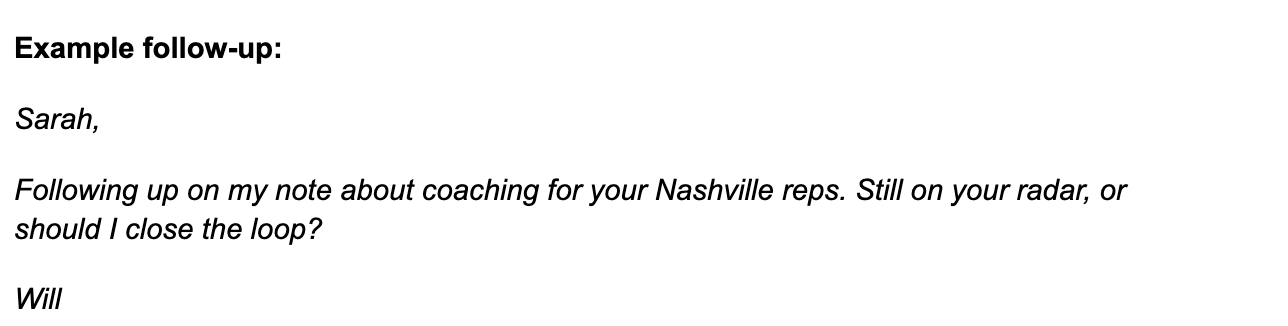
Why this works: It's short, non-pushy, and gives them an easy out. Respect their time and inbox.
Handling objections:
Got a "no" or "not interested"? Don't ghost. Respond with curiosity.
Example:
Totally understand! Quick question, how are you handling remote onboarding today? Always curious to learn what's working.
Sometimes "no" becomes "actually, let me explain our setup" → conversation → future opportunity.
Campaign Setup: From Theory to Execution
You've got the framework. Now let's talk execution.
Step 1: Build Your Target List in XemailCampaign
Use ICP filters to get specific:
Company size, revenue, industry
Tech stack (must use X, can't use Y competitor)
Recent activity (funding, hiring, product launch)
Step 2: Set Up Trigger Monitoring
Monitor for:
New hires in relevant roles
Funding announcements
Product launches
Negative press or earnings misses
Tech stack changes
XemailCampaign automates this. No more manual LinkedIn stalking at midnight.
Step 3: Segment by Persona
Your message to a VP is different from your message to a Director is different from your message to a Manager.
Create separate campaigns for each. Same ICP, different pain points, different language.
Step 4: Run, Monitor, Optimize
Track what's working:
Which ICP segments respond best
Which trigger events correlate with replies
What subject lines perform
What CTCs get responses
Use XemailCampaign's analytics to refine constantly. Data beats guesswork.
The Uncomfortable Truth About Cold Email
Here's what nobody wants to hear: Most cold emails fail because the sender doesn't actually care about the recipient.
They care about hitting quota. Booking meetings. Closing deals. Making money.
And recipients can smell that from a mile away.
The emails that work, the ones with good reply rates come from people who are genuinely curious about their prospects' problems. Who do actual research. Who craft messages that provide value even if the recipient never buys.
Cold email isn't a numbers game. It's a relevance game. A research game. A "do you actually understand my world" game.
You can send 10,000 emails and get 200 angry responses. Or you can send 500 to the right people, at the right time, with the right message, and get 75 conversations.
Which would you rather?
One Last Thing...
If you're still reading, you're more committed than 90% of people who clicked this article. That's worth something.
But reading doesn't equal results. Implementation does.
So here's my challenge: Take one campaign, just one, and run it with this framework. Tight ICP. Real research. 4-part structure. Easy CTC.
Use XemailAudit to catch deliverability issues before sending. Use XemailWarmup to protect your sender reputation. Use XemailCampaign to automate the research and targeting so you're not manually hunting prospects at 11 PM.
Then compare it to your old spray-and-pray approach.
The data will speak for itself.
P.S. If your current cold email template is over 100 words, has 3+ calls to action, asks for a meeting in the first email, or uses phrases like "just checking in", stop. Rewrite it. Your reply rates will thank you.
P.P.S. Want to see how your current emails stack up? Run them through XemailAudit's AI writing assistant. It'll roast you (politely), then tell you exactly what to fix. Sometimes you need that honest feedback.
Now go write some emails that actually get replies.